
 +1 619-743-9389
 Thermador Range Oven Error Code Beeping and Not Clearing
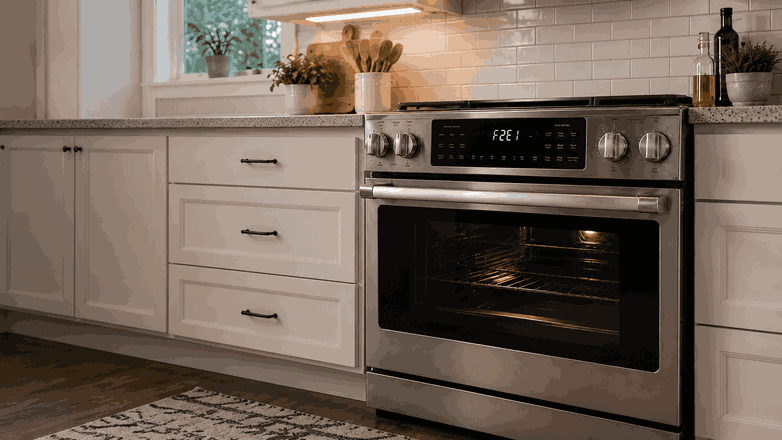
A Thermador range oven error code beeping and not clearing problem usually means the oven control is still detecting a fault after a reset or normal button input. The display may keep showing the same warning, the range may beep repeatedly, or the oven may refuse to start a cooking cycle.
For homeowners in San Diego, CA, this can interrupt daily cooking because a range combines surface burners or elements with a built-in oven system. The issue may involve the oven sensor, keypad, control board, door latch, cooling fan, or another monitored part. The goal is to understand what the warning may mean, what signs matter, and when professional range service makes sense.
What This Problem Usually Means
When a Thermador range oven keeps beeping and the error code does not clear, the appliance is usually reporting a condition that has not been resolved. The control system is not just showing a random message. It is reacting to a signal that still looks abnormal.
This can happen when the oven cannot read temperature correctly, when a keypad input appears stuck, or when the door latch does not report the right position. It can also happen if the control board cannot complete a heating or safety function.
The same symptom can have different causes. One range may have a simple control-panel issue. Another may have a sensor or internal electronic fault. That is why repeated beeping should be treated as a clue, not a complete diagnosis.
Common Signs of the Problem
Error Code Stays on the Display
The most obvious sign is an error code that stays on the display. It may return right after you cancel the cycle or restore power to the appliance.
Repeated Beeping
You may also hear repeated beeping. Sometimes it happens every few seconds. Other times it starts when you press bake, broil, self-clean, or another oven function.
Oven Refuses to Heat or Cancels the Cycle
The oven may refuse to heat, stop during preheating, or cancel the cycle shortly after it starts. In some cases, the surface cooking section still works, while the oven remains locked in fault mode.
Problem Appears After Power Loss, High Heat, or Self-Clean
Some homeowners notice the issue after a power interruption, high-temperature cooking, or a self-clean cycle. If the same code comes back after the range cools and resets, the underlying problem is still present.
Most Common Causes
Temperature Sensor Issue
One possible cause is a temperature sensor issue. If the oven cannot read internal temperature accurately, the control may stop heating and keep the fault active.
Keypad or Touch-Control Problem
Another common cause is a keypad or touch-control problem. A stuck key, moisture, grease, or a failing control panel can make the range beep or reject normal commands.
Door Latch or Lock Problem
A door latch or lock problem may also trigger persistent warnings. This is especially common when the issue appears after self-clean or when the oven thinks the door is locked at the wrong time.
Control Board Fault
There may also be a control board fault. The board manages the display, heating commands, timing, and safety responses. If it cannot read signals correctly, the error may not clear.
Cooling Fan, Wiring, Relay, or Internal Part Issue
In some cases, the issue involves the cooling fan, wiring, relay, or another internal part. These problems are usually not visible from the outside.
What Homeowners Can Check First
Write Down the Exact Code
Start by writing down the exact code and when it appears. Note whether it shows at startup, during preheat, after self-clean, or when a specific oven mode is selected.
Check the Control Panel
Check the control panel for moisture, grease, or a button that seems stuck. Wipe the surface gently with a soft cloth. Do not spray cleaner directly onto the panel.
Check the Oven Door and Latch Area
Make sure the oven door is fully closed and nothing is blocking the latch area. If the range recently ran a self-clean cycle, allow the appliance to cool completely before trying again.
Try One Basic Power Reset
You can also try a basic power reset at the household breaker. After power is restored, watch whether the same code returns.
Avoid Unsafe Internal Work
Avoid opening panels, forcing the door latch, testing wires, or continuing to run the oven while the same warning is active. Range oven faults can involve high heat and electrical components.
When Professional Service Makes Sense
Professional service makes sense when the Thermador range oven error code beeping and not clearing issue returns after basic checks, prevents heating, or keeps the oven locked in fault mode.
It is also time to request service if the beeping continues, the range cancels cycles, or the same warning appears after cooling and resetting. These signs may point to a sensor, latch, keypad, control board, fan, or internal wiring problem.
For homeowners in San Diego, CA, professional range service can help identify whether the fault is in the oven control system, temperature sensing, door lock, or another internal component. This helps avoid guesswork and repeated resets that do not solve the problem.
Related Support Information
Because this issue appears with a display warning, a related Thermador range error codes page can provide extra context. Still, the main concern is the behavior itself: the oven keeps beeping, the code will not clear, and the range is not returning to normal operation.
Conclusion
A Thermador range oven error code beeping and not clearing issue usually means the appliance is still detecting a fault in the oven system. The cause may involve the sensor, keypad, control board, door latch, cooling fan, or wiring. Safe checks can rule out simple issues, but repeated beeping or a code that returns usually calls for professional range service in San Diego, CA.
Related Thermador Range Troubleshooting Guides
Use these Thermador range resources to connect an oven error code that is beeping and not clearing with relevant diagnostic information and another closely related software issue.
Thermador Range Error Codes: Start with Thermador Range Error Codes when the appliance displays a diagnostic message related to oven operation, electronic controls, sensors, communication, or connected functions.
Thermador Range Home Connect Update Errors E0211 E1601 E0510: Review Thermador Range Home Connect Update Errors E0211 E1601 E0510 when the range cannot complete a Home Connect software update or displays one of these update-related codes.
These related guides help homeowners connect a Thermador range oven error code beeping and not clearing with diagnostic information and Home Connect update problems that may affect the control system.
Contact Information
Reset Appliance Repair – San Diego, CA
📍 Address: 11031 Via Brescia, San Diego, CA 92129
📧 Email: resetappliance@gmail.com
☎️ Phone: +1 619-743-9389
🕒 Open Hours: Monday – Sunday: 7:00 AM – 10:00 PM
